
CRM vs ERP is one of the most common questions Indian business owners ask once their spreadsheets start falling apart and their sales, inventory, and accounts teams stop being on the same page. Both are types of business management software, both promise to bring order to chaos, and both get pitched by vendors as “the one system you need.” But they solve very different problems. This guide breaks down what each system actually does, where they overlap, where they don’t, and how to decide which one, or both, your business needs, especially if you’re running an SME, a manufacturing unit, or a growing service company in India.
What Is ERP?
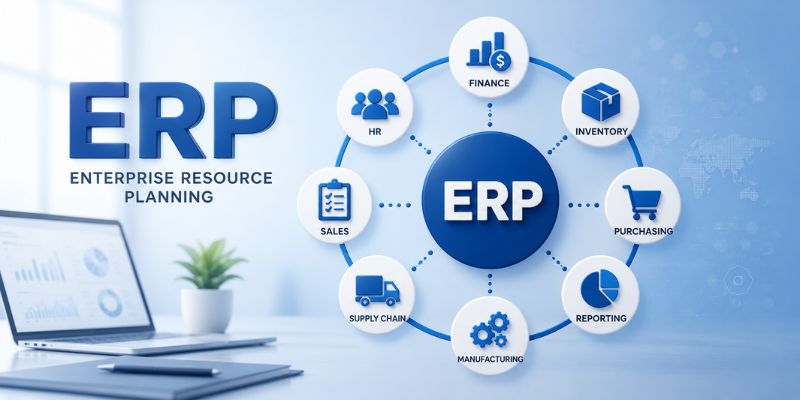
ERP stands for Enterprise Resource Planning. Think of it as the operational backbone of a company. It connects departments like finance, procurement, inventory, manufacturing, and HR into one system, so everyone works off the same data instead of five different Excel files that never match up.
An ERP system pulls together your accounts, stock levels, purchase orders, payroll, and production schedule, and puts them in one place. When your warehouse team updates stock, finance sees it instantly. When a purchase order goes out, procurement and accounts stay automatically in sync. This is what people mean by centralized data and operational visibility. You stop chasing numbers across departments and start looking at one source of truth.
For Indian businesses, ERP software also usually needs to handle GST compliance, e-invoicing, TDS calculations, and multi-branch inventory, things off-the-shelf global ERP tools don’t always get right out of the box. This is why many Indian companies go with India-specific ERP platforms or invest in ERP implementation services that customise a global platform for local tax rules.
What Is CRM?
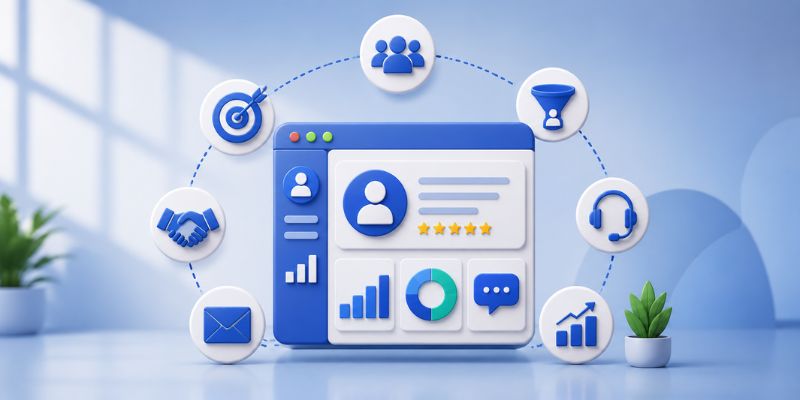
CRM stands for Customer Relationship Management. Where ERP looks inward at your operations, CRM looks outward at your customers. It’s built to manage everything related to how you sell to, support, and retain customers.
A good CRM keeps track of every lead, call, email, quotation, and follow-up due. Your sales team can see exactly where a deal stands. Support can see a customer’s full history before picking up the phone. Marketing can track which campaigns are actually converting into paying customers. This is the front office equivalent of what ERP does for the back office.
Enterprise CRM software has grown well beyond a simple contact list. Modern CRM software features include lead scoring, pipeline forecasting, WhatsApp integration, automated follow-up reminders, and reporting on conversion rates and sales cycle length. For relationship-driven sales, which is most of B2B in India, this visibility is the difference between closing a deal on time and losing it to a faster-following competitor.
CRM vs ERP: The Core Difference
Here’s the simplest way to think about it. ERP manages your business. CRM manages your customers.
| Aspect | ERP | CRM |
| Primary focus | Internal operations | Customer relationships |
| Core users | Finance, operations, supply chain, HR | Sales, marketing, customer support |
| Data type | Inventory, finances, production, payroll | Leads, contacts, deals, support tickets |
| Main goal | Operational efficiency and cost control | Customer acquisition and retention |
| Common modules | Accounting, procurement, production planning, HR | Lead management, pipeline tracking, campaigns, service desk |
Both systems centralize data, cut down on manual work, and give management better visibility into what’s actually happening. The difference is which half of the business they’re looking at, the half that makes your product and keeps the lights on, or the half that brings in revenue and keeps customers coming back.
ERP Modules You Should Know About
ERP modules are the individual functional blocks that make up the full system. Most businesses don’t need all of them on day one, and a good ERP consulting exercise figures out which modules actually matter for your business right now.
- Financial management: General ledger, payables and receivables, budgeting, and GST-ready reporting.
- Inventory and supply chain: Real-time stock tracking, procurement, and order fulfilment across warehouses or branches.
- Production planning: Schedules raw material use, machine time, and labour so production doesn’t stall or overrun.
- Human resources: Payroll, attendance, leave management, and recruitment in one place.
- Reporting and analytics: Dashboards giving owners a real-time view of business health instead of a month-end surprise.
- Compliance and risk management: Audit trails and regulatory checks, useful for businesses juggling GST, TDS, and other filings.
A well-scoped ERP implementation usually starts with two or three modules, typically finance and inventory, and expands from there. Rolling out every module at once is one of the most common reasons ERP projects run over budget and over time.
CRM Software Features That Actually Matter
Not every CRM feature is worth paying for, especially for a small team. Here are the ones that genuinely move the needle:
- Contact and account management: A single, always-updated record for every customer, with full interaction history.
- Sales pipeline management: Visual tracking of every deal, from first contact to closed-won, so nothing slips through the cracks.
- Marketing automation: Segment your audience, run email or WhatsApp campaigns, and track what’s actually generating leads.
- Customer service and support: Ticketing and case tracking, so support requests don’t live in someone’s personal inbox.
- Analytics and reporting: Conversion rates, average deal size, sales cycle length, and campaign ROI, all in one dashboard.
- Mobile and integration access: Field sales can update a deal from their phone, and the CRM talks to email, WhatsApp Business, and ideally your ERP too.
For Indian SMEs, a CRM that supports WhatsApp integration and regional language logs often matters more than fancy AI features that get marketed heavily but rarely get used.
Also Read: Digital Marketing Strategy: A Complete Guide to Building One That Actually Works
The Role of AI in ERP and CRM- CRM vs ERP
AI has quietly become a standard part of both ERP and CRM software, not as a gimmick, but as a genuine time saver once it’s set up correctly.
In ERP, AI mostly handles prediction and pattern spotting. It flags unusual spending before it becomes a real problem, predicts stock shortages based on past demand, and summarises financial reports that used to take hours to compile. Some newer platforms also catch duplicate invoices or data entry errors before they slip through, which matters for compliance-heavy Indian businesses.
In CRM, AI shows up on the customer-facing side. It scores leads based on how likely they are to convert, drafts follow-up emails so reps aren’t starting from a blank page, and summarises long call histories so a support agent can catch up on a customer in seconds instead of scrolling through months of records.
There’s also a newer category called agentic AI, where the system doesn’t just suggest an action, it takes one, like automatically reordering stock at a set threshold or sending a renewal reminder without a rep having to remember. This is still early for most Indian SMEs, but worth knowing about, since not every vendor offers it and pricing varies a lot.
AI works best when the underlying data is clean and centralized. A business still running on scattered spreadsheets won’t see much benefit from an “AI-powered” ERP or CRM, because the AI has nothing reliable to learn from. Getting the basics of ERP implementation or CRM implementation right is what actually makes the AI features worth paying for.
Benefits of ERP
A properly implemented ERP system pays off in a few concrete ways:
- Better financial management: Real-time data supports faster month-end closing, accurate budgeting, and cleaner GST filing.
- Data-driven decisions: Centralized reporting lets owners spot trends instead of relying on gut feeling or outdated reports.
- Improved efficiency: Automating invoice processing, stock updates, and payroll cuts manual work and human error.
- Scalability: Cloud ERP handles new branches, product lines, or higher order volumes without a system overhaul.
- Streamlined operations: One system replacing five disconnected tools means less redundant data entry and fewer coordination headaches.
Benefits of CRM
A CRM that’s actually used properly by the sales team delivers benefits that show up directly on the revenue line:
- Better customer retention: Full visibility into a customer’s history means your team can respond proactively instead of reactively.
- Cross-team collaboration: Sales, marketing, and support work off the same customer data instead of three separate versions of the truth.
- Stronger customer relationships: A complete view of every interaction helps teams personalise conversations instead of sounding like a cold call.
- Better marketing ROI: CRM data shows which campaigns generate leads that actually convert, not just clicks.
- More closed deals: Automated follow-up reminders mean fewer leads quietly go cold from someone forgetting to call back.
Benefits of ERP and CRM Integration
When ERP and CRM are connected instead of running as two separate systems, the benefits go beyond what either one delivers alone.
- End-to-end visibility: Track a customer from first enquiry all the way to delivery and payment, in one continuous view.
- Faster order-to-cash cycle: A closed deal in CRM can trigger a stock check, production planning, and invoicing in ERP, without re-entering the same data three times.
- Better forecasting: Sales data from CRM combined with inventory and financial data from ERP gives far more accurate demand and cash flow forecasts.
- Fewer errors and disputes: When sales promises and actual stock capacity come from the same live data, you avoid sales overselling what operations can deliver.
- One unified platform: Every department works from the same centralized data instead of chasing updates across systems.
This is the endgame most growing businesses are working toward, even if they don’t start there. The real value of asking CRM vs ERP isn’t picking a winner, it’s figuring out which one to fix first, with a plan to connect them later.
ERP Implementation vs CRM Implementation: What to Expect
ERP implementation services typically involve a longer timeline because you’re touching core operational processes, sometimes changing how departments work day to day. A realistic mid-sized ERP rollout in India takes three to nine months, depending on how many modules are involved and how much data needs migration. Expect phases like requirement mapping, data migration, module configuration, user training, and stabilization after go-live.
CRM implementation services are usually faster, often four to eight weeks for a small to mid-sized sales team, since you’re mainly configuring pipelines, importing contacts, and training the team rather than rebuilding financial processes from scratch.
In both cases, the biggest risk isn’t the software, it’s poor planning. Businesses that skip requirement gathering and jump straight to buying licenses often end up with a system that technically works but that nobody actually uses. This is the gap good ERP consulting and CRM consulting is meant to close, someone who has done this rollout before, in your industry, catching mistakes before they get expensive.
What Business Owners Are Actually Asking
If you look at forums, LinkedIn groups, and business communities where Indian SME owners discuss this, a few questions come up again and again:
“We’re a manufacturing unit with 40 employees, do we need ERP or CRM first?” Usually ERP, since production planning and inventory chaos tend to hurt manufacturers before sales visibility does.
“We’re a services company with a small team, is CRM enough?” Often yes, at least to start, since service businesses without heavy inventory needs get more immediate value from fixing their sales pipeline.
“Can we integrate our existing CRM with a new ERP instead of switching both?” Absolutely, and this is often the smarter, cheaper path than replacing both systems at once.
CRM vs ERP: Which One Does Your Business Need?
Choose ERP first if: you manufacture products or manage physical inventory, your finance and operations teams work off disconnected spreadsheets, you’re struggling with GST compliance or production delays, or you need operational visibility before you can trust your own numbers.
Choose CRM first if: your business runs on relationships and follow-ups, leads are falling through the cracks, you have little visibility into your sales pipeline, or customer retention matters more right now than internal process efficiency.
Choose both, ideally integrated, if: you’re scaling fast and both sales chaos and operational chaos are hurting you at once, you want a unified platform where a closed deal flows straight into inventory and finance, or you’ve outgrown manual handoffs between sales and operations.
Most businesses don’t need to decide once and forever. A sensible path for Indian SMEs is to start with CRM to fix the sales pipeline, since it’s cheaper and faster to deploy, then add ERP as operations scale and internal process pain becomes the bigger bottleneck. Larger or asset-heavy businesses often need to start with ERP because operational chaos is already the more expensive problem.
If you’re also exploring a custom-built solution instead of off-the-shelf ERP or CRM software, especially if your processes don’t fit a standard template, read our custom software development guide for Indian businesses, which covers when a custom build makes more sense than an off-the-shelf platform.
Getting the Rollout Right
Whichever system you pick, a few things consistently separate a successful rollout from a wasted budget:
- Map your actual processes first: Don’t buy a platform and then force your business into its default workflow.
- Clean your data before migration: Duplicate contacts and outdated stock records will follow you into the new system if you don’t fix them first.
- Involve the actual users early: Sales and accounts should have a say before the system is finalized, not after.
- Start with core modules, not everything at once: A phased rollout gets adoption faster than a big-bang launch.
- Budget for consulting, not just licenses: Good ERP consulting or CRM consulting avoids the six-month “why isn’t anyone using this” phase that follows a poorly planned rollout.
Interesting Reads:
Website Design Company: The Complete Guide to Professional Website Design & UI/UX Services
Website Conversion Optimization: 10 Proven Strategies to Increase Leads
How to Optimize WordPress Website Speed in 2026 (Complete Guide)